OSRS Bingo — Free Clan Bingo Boards for Old School RuneScape
OSRS bingo is the most popular clan event format in Old School RuneScape, and The Birdhouse is a free tool for building and running one. Create a board from 3×3 up to 15×15, fill it with drops, clues, skilling targets and quests, split your clan into teams, and let the board track marks, points and screenshot proof for you. No download, no plugin, no player cap.
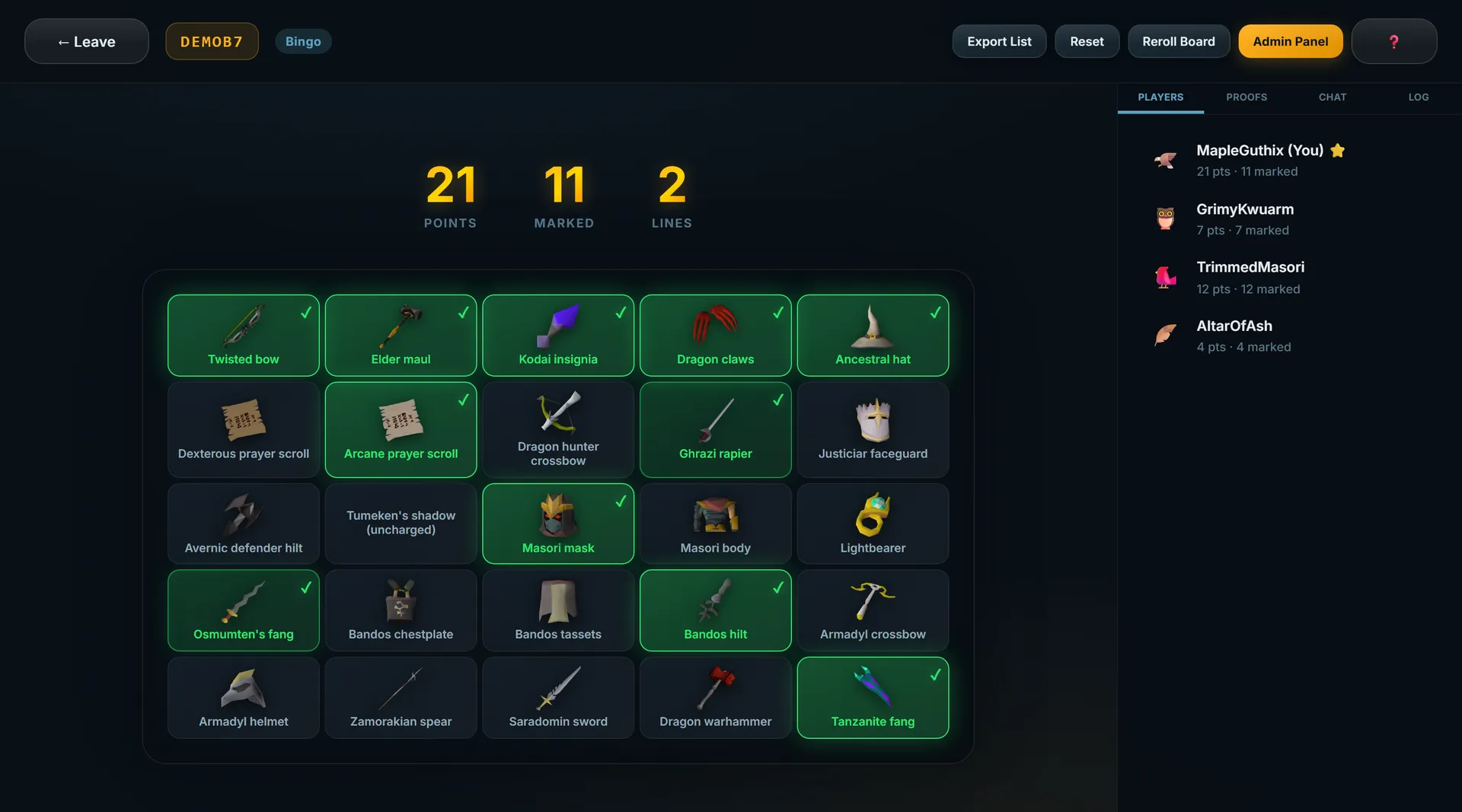
What Is OSRS Bingo?
An OSRS bingo board is a grid of tasks. Every tile holds one Old School RuneScape objective — get a Dragon Warhammer, finish a hard clue, reach 90 Slayer, complete Dragon Slayer II — and a tile is marked when someone completes it and posts proof. The grid is what makes it a bingo rather than a checklist: tiles that sit in the same row, column or diagonal are worth chasing together, because completing a full line pays a bonus on top of the individual tiles.
That single mechanic is why bingo works so well for clans. A player who will never out-grind the top PvMer can still swing the event by picking up the two skilling tiles that finish a line. Hosts get to tune how competitive it feels purely by choosing tasks and point values, without changing any rules.
Most clan bingos run for one to four weeks, with a fixed start and end time, a roster locked before the start, and one or two admins approving proof as it comes in. Everything else — team sizes, scoring, whether drops must be obtained during the event window — is up to the host.
How Bingo Works on The Birdhouse
- Create a free account — username and password only, no email required.
- Create a bingo room and pick a board size between 3×3 and 15×15.
- Fill the tiles — type them in, paste a list, or import straight from a Google Sheet.
- Set scoring — points per tile, line bonus, blackout bonus, and whether diagonals count.
- Choose solo or teams — up to 10 teams with unlimited members each.
- Share the room code so your clan can join from any browser.
- Players submit proof — screenshots attached to a tile, reviewed by an admin.
- The board updates live — approved tiles mark instantly for everyone watching.
Choosing a Board Size
Board size is the single biggest decision a host makes, because it sets how much grinding the event demands. The rough guide below assumes an active roster rather than a signup list:
| Board | Tiles | Good for |
|---|---|---|
| 3×3 | 9 | A weekend sprint or a first-time trial run |
| 5×5 | 25 | The standard clan bingo — one to two weeks |
| 7×7 | 49 | Two to four weeks with 20+ active players |
| 10×10 and up | 100+ | Month-long events, large clans, or blackout races |
Boards do not have to be square, and non-square boards simply skip the diagonal bonus. If you are unsure, size down: an event that finishes with a close blackout race beats one that stalls at 40% because the board was too big for the roster.
Scoring: Tiles, Lines and Blackout
The Birdhouse scores three things at once, and you set all three when you create the room:
- Tile points — awarded for every marked tile. Defaults to 1, and you can override it per tile so a Twisted Bow is worth more than a hard clue.
- Line bonus — awarded for each completed row, column and (on square boards) diagonal. Defaults to 5.
- Blackout bonus — awarded once for marking every tile on the board. Defaults to 20.
The ratio between these numbers is what actually shapes play. A high line bonus relative to tile points pushes teams to work rows deliberately and makes the board strategic; a low one turns the event into a pure race for volume. If you want the details, including weighted and blackout-only variants, the bingo rules and scoring guide works through each system with a copy-paste ruleset.
Tiles That Do More Than One Thing
A tile is not limited to a single drop. When you build the board you can set requirements that read the way a real ruleset does:
- Either/or tiles — any one of several drops counts, which is how you make a boss tile fair across gear levels.
- All-of tiles — every listed item is needed before the tile marks.
- Quantity tiles — a target count rather than a single item, so the whole team contributes to the same square instead of one person claiming it.
- Kill count tiles — a number of boss kills rather than a drop, useful when you want a tile that can't be no-lifed by a lucky first kill.
- Drop table tiles — any unique from a given boss.
Need actual tasks? The OSRS bingo tile ideas list has over 150 tiles sorted by difficulty, plus ready-made 3×3 and 5×5 starter boards.
Features
Any size from 9 to 225 tiles, square or rectangular, set when you create the room.
Build your tile list in a spreadsheet and import it straight into the board.
Up to 10 images per submission via drag and drop, clipboard paste or file browse.
Nothing marks until an admin approves it, so disputes are settled before the score moves.
Unlimited members per team, with shared marks and a private per-team chat channel.
Approved tiles, scores and completed lines appear instantly for everyone in the room.
A read-only link clanmates can open without an account to follow the standings.
Optionally let qualifying drops submit themselves through the Dink RuneLite plugin.
Solo Boards vs Team Boards
A bingo room runs in one of two shapes. In solo mode every player gets their own board and their own score, which suits open events where people drop in and out and you want a straight leaderboard. In teams mode marks are shared: when any member gets a tile approved it marks for the whole team, and the team competes as a unit.
Teams mode is what most clans want, because it lets a 40-person roster take part without the board being finished in a day. It also gives slower players something to do — quantity tiles and skilling tiles let anyone contribute to a square that a top PvMer would otherwise claim alone.
Why Not Just Use a Spreadsheet?
Plenty of clans run bingo out of a Google Sheet and a Discord channel. It works, but the host ends up doing three manual jobs: chasing screenshots posted in the wrong channel, transcribing marks into cells, and recalculating scores whenever a line completes.
- Proof stays attached to the tile instead of scrolling away in a Discord channel, so any dispute can be re-checked weeks later.
- Scores recalculate themselves, including line and blackout bonuses, so nobody has to audit a formula mid-event.
- Everyone sees the same board in real time rather than a screenshot of the sheet someone posted an hour ago.
- You keep your spreadsheet if you want it — the tile list imports directly from Google Sheets.
Bingo and the Other Birdhouse Modes
Bingo is the flagship mode, but the same tile lists and the same proof workflow drive five other formats. If your clan has already run a few bingos and wants a change of pace without relearning anything:
- Battleship Bingo — two teams hide fleets on a shared board and every approved proof is a shot at the enemy.
- Tile Race — roll dice and race along a track, with trap and boost tiles.
- Territory War — a Risk-style map where drops claim and defend territory.
- Chip Drop — Connect Four, where winning a drop race decides where your chip falls.
- Boss Tycoon — a Monopoly-style board built around boss drops.
Guides for Hosts
- How to run an OSRS bingo event — the full end-to-end workflow, from scheduling to prize payout.
- How to make an OSRS bingo board — building the grid and importing from Google Sheets.
- OSRS bingo tile ideas — 150+ tiles by difficulty, plus starter boards.
- OSRS bingo rules and scoring — scoring systems, proof standards and a ruleset template.
- OSRS bingo event ideas — themed boards, alternative formats and prize structures.
Frequently Asked Questions
What is OSRS bingo?
OSRS bingo is a clan event built on a grid of tasks. Each tile holds an Old School RuneScape objective — a boss drop, a clue reward, a skilling target, a quest — and players mark tiles off by completing them and posting screenshot proof. Teams score points per tile, bonus points for completing a full row, column or diagonal, and a large bonus for a blackout where every tile is marked.
How big can an OSRS bingo board be?
Anywhere from 3×3 up to 15×15, so 9 tiles at the smallest and 225 at the largest. Boards do not have to be square. A 5×5 board is the usual choice for a one or two week clan event, 3×3 suits a weekend sprint, and 7×7 or larger is for month-long events with a big roster.
How is OSRS bingo scored?
The default is 1 point per marked tile, 5 bonus points for each completed row, column or diagonal, and 20 bonus points for a blackout. All three are configurable when you create the room, and individual tiles can carry custom point values so harder tasks are worth more. Diagonal bonuses can be switched off and only apply to square boards.
Is OSRS bingo free to host?
Yes. Hosting on The Birdhouse is completely free — no ads, no premium tier, no player cap. There is no RuneLite plugin or download required; the board runs in a browser on desktop, tablet or phone, and players join with a room code.
How do teams work?
A room runs solo, where every player has their own board and score, or in teams mode with up to 10 teams and unlimited members each. In teams mode marks are shared — when any member gets a tile approved it marks for the whole team — and each team gets a private chat channel.
How do players prove they completed a tile?
Players attach screenshot proof to their submission, with up to 10 images each, via drag and drop, clipboard paste or file browse. An admin reviews it and the tile only marks once approved. Clans running the Dink RuneLite plugin can also have qualifying drops submitted automatically.
Can people watch without an account?
Yes. Every room has a read-only leaderboard link that anyone can open without signing up, and there is a spectate option on the homepage for following a game in progress.
© 2026 The Birdhouse — Free OSRS Board Games